Guides · For job seekers
How to List Certifications on a Resume (Without Overstating One)
Where certifications go, what order to list them in, the exact format for each line — and how to handle in-progress, expired, and license-versus-cert questions honestly.
Published 08/11/2026 · Updated 09/29/2026
You put real hours into earning a certification — study nights, an exam fee, maybe a whole renewal cycle. Then it ends up buried in a skills line where nobody sees it, or worded so loosely it sounds like a claim you can’t back. Here’s exactly where certifications go on a resume, what order to put them in, how to format each line, and how to handle the messy cases — in progress, expired, or actually a license — without overstating a single one.
Where to list certifications on a resume
Give them their own labeled section: Certifications (or Licenses & Certifications if you hold both). Screening software keys on standard section headings, and a labeled block is what recruiters’ eyes jump to when a posting requires a credential.
Placement depends on how load-bearing the cert is:
- Required for the job (nursing, IT, project management, skilled trades): put the section high — right after your summary, before or right after Experience.
- Supporting evidence: after Experience and Education is fine.
- After your name — only for credentials your field routinely puts there: RN, PE, CPA, PMP. A useful test: if job postings in your field put the acronym in the job title, it can follow your name. If not, keep it in the section.
What order to list certifications on a resume
Not alphabetical, and not oldest-first. Two rules, in order:
- Relevance first. The credential the posting asks for leads the block, every time — even if it’s your oldest.
- Then recency. Among certs of similar relevance, newest first, because currency is part of what a credential says.
If you hold many, trim rather than stack: three relevant lines beat eight mixed ones, and the trimmed ones can live on your long-form profile instead.
The format line: full name, acronym, issuer, date
One line per credential, in this shape:
Full name (Acronym) — Issuing organization, date earned or current-through date
- Certified ScrumMaster (CSM) — Scrum Alliance, current through 11/2027
- CompTIA Security+ — CompTIA, current through 05/2028
- OSHA 30-Hour General Industry course completion card — [training provider], completed 2024
OSHA calls its 10- and 30-hour cards course completion cards, not certifications, so you can also list them under Training.
Spell out the full name and the acronym, because you can’t know which one a recruiter searches for. Name the issuer — “Six Sigma Green Belt” means different things from different providers, and the issuer is what makes the line checkable. Include the expiration or current-through date whenever the credential has one; an unlabeled expiring cert invites the question you least want asked in an interview.
In-progress certifications: the honest version
A cert you’re actively pursuing can absolutely go on the page — labeled as exactly what it is:
- PMP — exam scheduled [month/year] (when a date is booked)
- AWS Certified Solutions Architect – Associate — in progress, expected [month/year] (when you’re partway through)
What never works: listing the bare acronym under Certifications and letting the reader assume it’s earned. Credentials get checked — during background checks, credentialing, or a casual interview question — and “I meant I was planning to take it” is a conversation you don’t recover from. If you haven’t started studying and have no date, it doesn’t belong on the resume at all.
Expired certifications
Three honest options:
- Renew before you apply, if it’s required and renewable — the cleanest fix.
- List it as expired — “CCNA — Cisco (expired 2023)” — when the underlying skill still matters and you’re upfront about status.
- Leave it off when it’s neither current nor relevant.
The one option that doesn’t exist: listing it as if it were current. That’s a dated, checkable claim.
Licenses vs. certifications
They’re not the same thing, and readers in licensed fields know the difference. A license is government permission to practice — a state nursing license, an electrician’s license, a CDL. A certification is a credential from a professional body. If you hold both, use the heading Licenses & Certifications and put the license first with its state and status: “Registered Nurse — Georgia, active.” Employers in licensed fields screen on the license before anything else.
The mistakes that cost you credibility
- Acronym only, no full name — invisible to half the searches.
- “Certified in project management” with no credential name or issuer — reads as a claim, not a credential.
- An in-progress cert formatted like an earned one.
- The required cert buried at the bottom of page two.
- Course completions dressed up as certifications — a weekend course is worth listing, but call it what it is, under Training or Professional Development.
A before-and-after
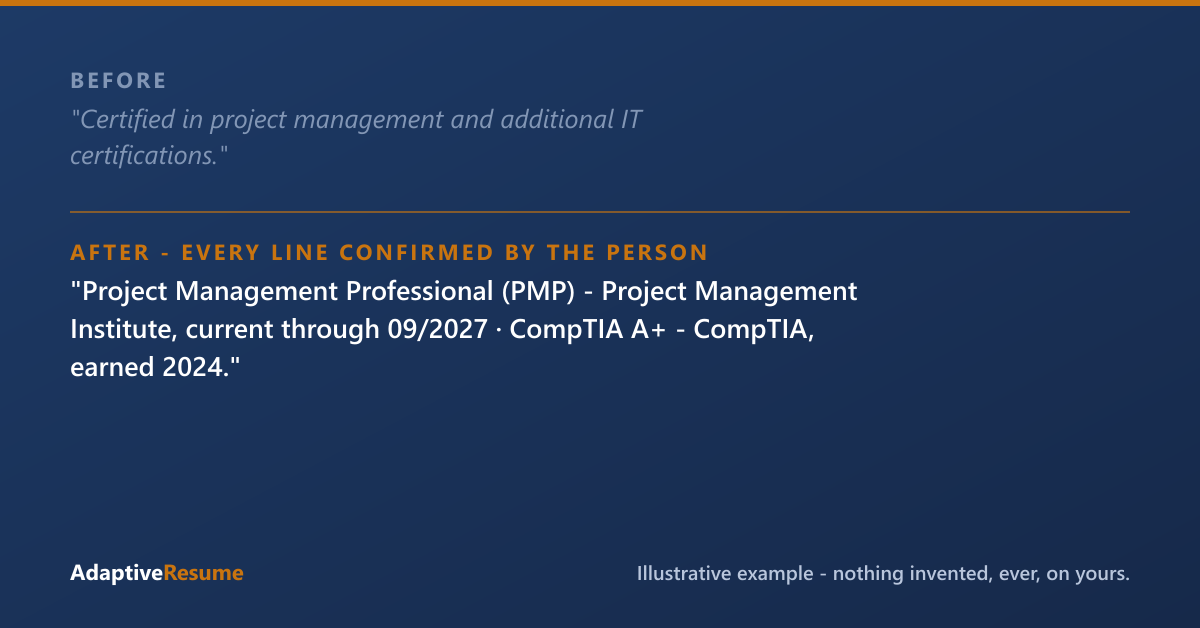
Illustrative example. Everything on your resume is yours: the experience you listed, plus the skills, tools, responsibilities, and credentials your work already involved, each added only after you confirm it’s true.
Before: “Certified in project management and additional IT certifications.”
After: “Project Management Professional (PMP) — Project Management Institute, current through 09/2027 · CompTIA A+ — CompTIA, current through 03/2027.”
Same person, same credentials — no new facts added. The rewrite just names what was already true precisely enough to be searched, checked, and believed. That’s the whole job of this section: every line should survive the question “can I see the credential?”
How we handle certifications
When we build your resume, we work backwards from what your work actually involved — and certifications get the strictest treatment of anything on the page, because they’re the most checkable. We never print a certification as held until you confirm you hold it, and you can edit each line so it reads exactly as your credential does, including an in-progress label or a current-through date. Nothing lands on the page without your say-so. Grab the Certification Section Cheat-Sheet below for the format lines to copy.
Common questions
Should certifications go at the top or the bottom of a resume?
Wherever they carry the most weight for the job. If the posting requires a specific credential, put the section high — right after your summary — so it's found in the first skim. If certifications are supporting evidence rather than requirements, listing them after Experience and Education is fine.
How do I list a certification I'm still working on?
Label it plainly: 'In progress — expected [month/year],' or 'Exam scheduled [month/year]' if a date is booked. Never list it in a way that could be read as earned; that reads as dishonest the moment anyone checks.
Do I need to include the year I earned a certification?
Include a date whenever the credential expires or currency matters — 'current through [date]' answers the question before it's asked. For non-expiring certs, the year earned is optional but helpful. Never guess a date; check the credential.
Certification Section Cheat-Sheet
Pop your email in and the download unlocks right here. Joining our list also takes 25% off your first purchase within 30 days of joining, when you create your account with this same email. We'll also send the occasional useful note. No spam.
Download: Certification Section Cheat-SheetThanks, you're on our list, and your download is ready just above. Your 25% off a first purchase is good for 30 days from the day this email joined our list.
That email didn't look right — mind trying it again?
Ready to do this on your own resume?
We'll find what you've left off, and nothing goes on your resume that you didn't give us or confirm.
Get your resume build — $29Every purchase is one payment, and nothing renews. A single resume build can be used any time within 12 months of buying it, and AR Pass builds you don't use end when its 90 days end.
Try the demo first — a sample review, no sign-up · See how the service works
Paid a resume service and got a template back? Start at Fix my resume.